语法解析
在教育资源中,文本、公式都具有内在的隐式或显式的语法结构,提取这种结构对后续进一步的处理是大有裨益的:
文本语法结构解析
公式语法结构解析
其目的是:
1、将选择题中的括号,填空题中的下划线用特殊标识替换掉,并将字符、公式用$$包裹起来,使item能通过$符号准确的按照类型切割开;
2、判断当前item是否合法,并报出错误类型。
具体处理内容
1.匹配公式之外的英文字母、数字,只对两个汉字之间的字母、数字做修正,其余匹配到的情况视为不合 latex 语法录入的公式
2.匹配“( )”型括号(包含英文格式和中文格式),即括号内无内容或为空格的括号,将括号替换 $\\SIFChoice$
3.匹配下划线,替换连续的下划线或下划线中夹杂空格的情况,将其替换为 $\\SIFBlank$
4.匹配latex公式,主要检查latex公式的完整性和可解析性,对latex 中出现中文字符发出警告
公式语法结构解析
本功能主要由EduNLP.Formula模块实现,具有检查传入的公式是否合法,并将合法的公式转换为art树的形式。从实际使用的角度,本模块常作为中间处理过程,调用相应的模型即可自动选择本模块的相关参数,故一般不需要特别关注。
主要内容介绍
1.Formula:对传入的单个公式进行判断,判断传入的公式是否为str形式,如果是则使用ast的方法进行处理,否则进行报错。此外,提供了variable_standardization参数,当此参数为True时,使用变量标准化方法,即同一变量拥有相同的变量编号。
2.FormulaGroup:如果需要传入公式集则可调用此接口,最终将形成ast森林,森林中树的结构同Formula。
Formula
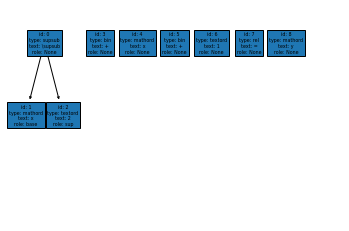
Formula 首先在分词功能中对原始文本的公式做切分处理,另外提供 公式解析树 功能,可以将数学公式的抽象语法分析树用文本或图片的形式表示出来。
本模块另提供公式变量标准化的功能,如判断几个子公式内的‘x’为同一变量。
调用库
import matplotlib.pyplot as plt
from EduNLP.Formula import Formula
from EduNLP.Formula.viz import ForestPlotter
初始化
传入参数:item
item为str 或 List[Dict]类型,具体内容为latex 公式 或 公式经解析后产生的抽象语法分析树。
>>> f=Formula("x^2 + x+1 = y")
>>> f
<Formula: x^2 + x+1 = y>
查看公式切分后的具体内容
查看公式切分后的结点元素
>>> f.elements
[{'id': 0, 'type': 'supsub', 'text': '\\supsub', 'role': None},
{'id': 1, 'type': 'mathord', 'text': 'x', 'role': 'base'},
{'id': 2, 'type': 'textord', 'text': '2', 'role': 'sup'},
{'id': 3, 'type': 'bin', 'text': '+', 'role': None},
{'id': 4, 'type': 'mathord', 'text': 'x', 'role': None},
{'id': 5, 'type': 'bin', 'text': '+', 'role': None},
{'id': 6, 'type': 'textord', 'text': '1', 'role': None},
{'id': 7, 'type': 'rel', 'text': '=', 'role': None},
{'id': 8, 'type': 'mathord', 'text': 'y', 'role': None}]
查看公式的抽象语法分析树
>>> f.ast
[{'val': {'id': 0, 'type': 'supsub', 'text': '\\supsub', 'role': None},
'structure': {'bro': [None, 3],'child': [1, 2],'father': None,'forest': None}},
{'val': {'id': 1, 'type': 'mathord', 'text': 'x', 'role': 'base'},
'structure': {'bro': [None, 2], 'child': None, 'father': 0, 'forest': None}},
{'val': {'id': 2, 'type': 'textord', 'text': '2', 'role': 'sup'},
'structure': {'bro': [1, None], 'child': None, 'father': 0, 'forest': None}},
{'val': {'id': 3, 'type': 'bin', 'text': '+', 'role': None},
'structure': {'bro': [0, 4], 'child': None, 'father': None, 'forest': None}},
{'val': {'id': 4, 'type': 'mathord', 'text': 'x', 'role': None},
'structure': {'bro': [3, 5], 'child': None, 'father': None, 'forest': None}},
{'val': {'id': 5, 'type': 'bin', 'text': '+', 'role': None},
'structure': {'bro': [4, 6], 'child': None, 'father': None, 'forest': None}},
{'val': {'id': 6, 'type': 'textord', 'text': '1', 'role': None},
'structure': {'bro': [5, 7], 'child': None, 'father': None, 'forest': None}},
{'val': {'id': 7, 'type': 'rel', 'text': '=', 'role': None},
'structure': {'bro': [6, 8], 'child': None, 'father': None, 'forest': None}},
{'val': {'id': 8, 'type': 'mathord', 'text': 'y', 'role': None},
'structure': {'bro': [7, None],'child': None,'father': None,'forest': None}}]

>>> print('nodes: ',f.ast_graph.nodes)
nodes:  [0, 1, 2, 3, 4, 5, 6, 7, 8]
>>> print('edges: ' ,f.ast_graph.edges)
edges:  [(0, 1), (0, 2)]
将抽象语法分析树用图片表示
>>> ForestPlotter().export(f.ast_graph, root_list=[node["val"]["id"] for node in f.ast if node["structure"]["father"] is None],)
>>> plt.show()
变量标准化
此参数使得同一变量拥有相同的变量编号。
如:x 变量的编号为 0, y 变量的编号为 1。
>>> f.variable_standardization().elements
[{'id': 0, 'type': 'supsub', 'text': '\\supsub', 'role': None},
{'id': 1, 'type': 'mathord', 'text': 'x', 'role': 'base', 'var': 0},
{'id': 2, 'type': 'textord', 'text': '2', 'role': 'sup'},
{'id': 3, 'type': 'bin', 'text': '+', 'role': None},
{'id': 4, 'type': 'mathord', 'text': 'x', 'role': None, 'var': 0},
{'id': 5, 'type': 'bin', 'text': '+', 'role': None},
{'id': 6, 'type': 'textord', 'text': '1', 'role': None},
{'id': 7, 'type': 'rel', 'text': '=', 'role': None},
{'id': 8, 'type': 'mathord', 'text': 'y', 'role': None, 'var': 1}]
FormulaGroup
调用 FormulaGroup 类解析公式方程组,相关的属性和函数方法同上。
import matplotlib.pyplot as plt
from EduNLP.Formula import Formula
from EduNLP.Formula import FormulaGroup
from EduNLP.Formula.viz import ForestPlotter
>>> fs = FormulaGroup(["x^2 = y", "x^3 = y^2", "x + y = \pi"])
>>> fs
<FormulaGroup: <Formula: x^2 = y>;<Formula: x^3 = y^2>;<Formula: x + y = \pi>>
>>> fs.elements
[{'id': 0, 'type': 'supsub', 'text': '\\supsub', 'role': None},
{'id': 1, 'type': 'mathord', 'text': 'x', 'role': 'base'},
{'id': 2, 'type': 'textord', 'text': '2', 'role': 'sup'},
{'id': 3, 'type': 'rel', 'text': '=', 'role': None},
{'id': 4, 'type': 'mathord', 'text': 'y', 'role': None},
{'id': 5, 'type': 'supsub', 'text': '\\supsub', 'role': None},
{'id': 6, 'type': 'mathord', 'text': 'x', 'role': 'base'},
{'id': 7, 'type': 'textord', 'text': '3', 'role': 'sup'},
{'id': 8, 'type': 'rel', 'text': '=', 'role': None},
{'id': 9, 'type': 'supsub', 'text': '\\supsub', 'role': None},
{'id': 10, 'type': 'mathord', 'text': 'y', 'role': 'base'},
{'id': 11, 'type': 'textord', 'text': '2', 'role': 'sup'},
{'id': 12, 'type': 'mathord', 'text': 'x', 'role': None},
{'id': 13, 'type': 'bin', 'text': '+', 'role': None},
{'id': 14, 'type': 'mathord', 'text': 'y', 'role': None},
{'id': 15, 'type': 'rel', 'text': '=', 'role': None},
{'id': 16, 'type': 'mathord', 'text': '\\pi', 'role': None}]
>>> fs.ast
[{'val': {'id': 0, 'type': 'supsub', 'text': '\\supsub', 'role': None},
'structure': {'bro': [None, 3],
   'child': [1, 2],
   'father': None,
   'forest': None}},
{'val': {'id': 1, 'type': 'mathord', 'text': 'x', 'role': 'base'},
'structure': {'bro': [None, 2],
   'child': None,
   'father': 0,
   'forest': [6, 12]}},
{'val': {'id': 2, 'type': 'textord', 'text': '2', 'role': 'sup'},
'structure': {'bro': [1, None], 'child': None, 'father': 0, 'forest': None}},
{'val': {'id': 3, 'type': 'rel', 'text': '=', 'role': None},
'structure': {'bro': [0, 4], 'child': None, 'father': None, 'forest': None}},
{'val': {'id': 4, 'type': 'mathord', 'text': 'y', 'role': None},
'structure': {'bro': [3, None],
   'child': None,
   'father': None,
   'forest': [10, 14]}},
{'val': {'id': 5, 'type': 'supsub', 'text': '\\supsub', 'role': None},
'structure': {'bro': [None, 8],
   'child': [6, 7],
   'father': None,
   'forest': None}},
{'val': {'id': 6, 'type': 'mathord', 'text': 'x', 'role': 'base'},
show more (open the raw output data in a text editor) ...
>>> fs.variable_standardization()[0]
[{'id': 0, 'type': 'supsub', 'text': '\\supsub', 'role': None}, {'id': 1, 'type': 'mathord', 'text': 'x', 'role': 'base', 'var': 0}, {'id': 2, 'type': 'textord', 'text': '2', 'role': 'sup'}, {'id': 3, 'type': 'rel', 'text': '=', 'role': None}, {'id': 4, 'type': 'mathord', 'text': 'y', 'role': None, 'var': 1}]
>>> ForestPlotter().export(fs.ast_graph, root_list=[node["val"]["id"] for node in fs.ast if node["structure"]["father"] is None],)

文本语法结构解析
本部分主要由EduNLP.SIF.Parse模块实现,主要功能为将文本中的字母、数字等进行提取,将其转换为标准格式。
此模块主要作为 中间模块 来对输入的生文本进行解析处理,用户一般不直接调用此模块。
主要流程介绍
1.按照以下顺序,先后对传入的文本进行判断类型
is_chinese:用于匹配中文字符 [u4e00-u9fa5]
is_alphabet:匹配公式之外的英文字母,将匹配到的只对两个汉字之间的字母做修正(使用$$包裹起来),其余匹配到的情况视为不合 latex 语法录入的公式
is_number:匹配公式之外的数字,只对两个汉字之间的数字做修正(使用$$包裹起来),其余匹配到的情况视为不合 latex 语法录入的公式
2.匹配 latex 公式
latex 中出现中文字符,打印且只打印一次 warning
使用_is_formula_legal函数,检查latex公式的完整性和可解析性,对于不合法公式报错
调用库
from EduNLP.SIF.Parser import Parser
输入
类型:str
内容:题目文本 (text)
>>> text1 = '生产某种零件的A工厂25名工人的日加工零件数_   _'
>>> text2 = 'X的分布列为(   )'
>>> text3 = '① AB是⊙O的直径,AC是⊙O的切线,BC交⊙O于点E.AC的中点为D'
>>> text4 = '支持公式如$\\frac{y}{x}$,$\\SIFBlank$,$\\FigureID{1}$,不支持公式如$\\frac{ \\dddot y}{x}$'
进行解析
>>> text_parser1 = Parser(text1)
>>> text_parser2 = Parser(text2)
>>> text_parser3 = Parser(text3)
>>> text_parser4 = Parser(text4)
相关描述参数
尝试转换为标准形式
>>> text_parser1.description_list()
>>> print('text_parser1.text:',text_parser1.text)
text_parser1.text: 生产某种零件的$A$工厂$25$名工人的日加工零件数$\SIFBlank$
>>> text_parser2.description_list()
>>> print('text_parser2.text:',text_parser2.text)
text_parser2.text: $X$的分布列为$\SIFChoice$
判断是否有语法问题
>>> text_parser3.description_list()
>>> print('text_parser3.error_flag: ',text_parser3.error_flag)
text_parser3.error_flag:  1
>>> text_parser4.description_list()
>>> print('text_parser4.fomula_illegal_flag: ',text_parser4.fomula_illegal_flag)
text_parser4.fomula_illegal_flag:  1